Building Standardized Co-Simulation Workflows for Automotive and Mobility: An Open-Source Demo

The automotive and mobility industry is embracing virtual testing at scale. To make these simulations realistic and interoperable, standardization is key. That’s why we created the Standardized Co-Simulation Demo, an open-source example of how to combine scenario execution, sensor simulation, and multi-domain orchestration using OpenMCx, esmini, and our own physical sensor models, all aligned with ASAM OpenX standards.
Check out the GitHub repository here.

Why This Matters
Modern vehicle development involves complex interactions between traffic scenarios, vehicle dynamics, perception systems and behavior planning. Without standardized interfaces, integrating these components into a simulation becomes a challenge. This demo shows how standards like FMI, SSP, and ASAM OpenX (OpenDRIVE, OpenSCENARIO XML, OpenMATERIAL 3D, OSI) create a consistent ecosystem for simulation and testing.
What’s Inside the Demo?
1. Co-Simulation Setup with OpenMCx
OpenMCx acts as the backbone for orchestrating distributed simulations. System definitions follow the SSP standard, ensuring modularity and interoperability.
2. Scenario Execution with esmini
esmini, a lightweight ASAM OpenSCENARIO XML player, runs traffic scenarios and visualizes them. Packaged as an FMU, it integrates seamlessly via the FMI standard and communicates through ASAM OSI.
3. ASAM OpenX Standards in Action
OpenDRIVE: Road network representation
OpenSCENARIO XML: Scenario and behavior modeling
OpenMATERIAL 3D: Realistic 3D geometries and material properties
OSI: Sensor and environment data exchange
Together, these standards enable a unified simulation environment.
4. Physical Perception Sensor Simulation
The demo includes a physical lidar sensor model using ray tracing for realistic perception testing. This model leverage the Persival Sensor Model Development Library (SMDL) for accurate rendering.
Access the GitHub repository here.
ASAM OpenX Assets: The Foundation for Realistic Scenarios
The demo repository includes a submodule: ASAM OpenX Data and Assets. This collection demonstrates how ASAM standards work together to create consistent simulation environments. It contains all assets you need for a fully consistent simulation across the ASAM OpenX standards.
An exemplary OpenDRIVE map of a highway defines the road geometry and topology.
An OpenSCENARIO XML file references the OpenDRIVE map and contains a driving scenario on the highway.
OpenMATERIAL 3D assets of the full highway environment as well as assets of all involved vehicles add physical realism with 3D geometry and material mapping.
This layered approach ensures consistency between logical, dynamic, and physical representations.

How It Works
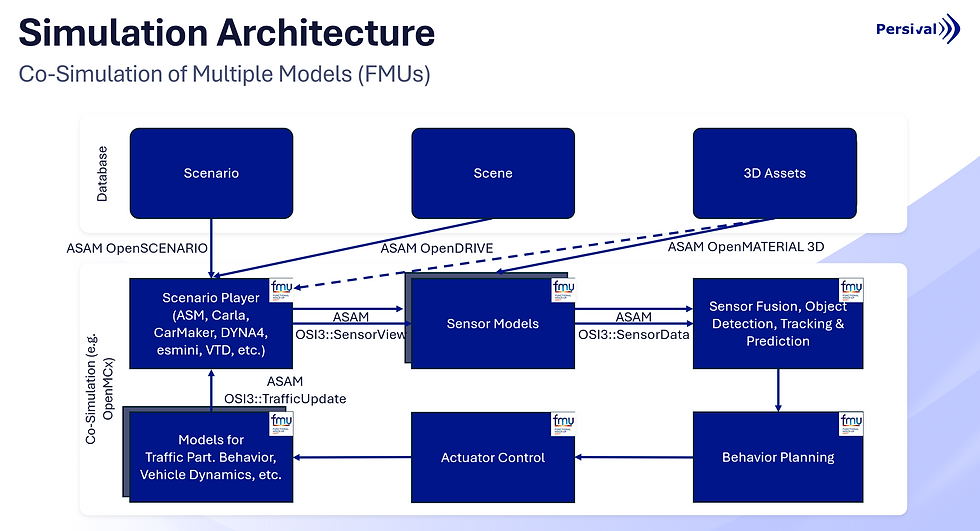
Each component is packaged as an FMU according to the FMI standard. The SSD file (System Structure Definition) defines which models are used and how they connect. OpenMCx loads this SSD and manages communication during runtime.
Scenario Player: The esmini FMU executes ASAM OpenSCENARIO XML files referencing ASAM OpenDRIVE and ASAM OpenMATERIAL 3D assets.
Sensor Models: Generate realistic outputs (e.g., lidar point clouds) based on OSI SensorView messages.
Trace File Writer: Stores simulation data in ASAM OSI trace files for later analysis.
Getting Started
All you need to try it out yourself is a computer with Ubuntu >= 20.04 and an Nvidia RTX GPU with a driver >= 535. Simply follow the instructions in the README of the repository to clone, build and run the full co-simulation within minutes.
Visualize Your Data
Use Persival Simspector to visualize ASAM OSI trace files with full ASAM OpenMATERIAL 3D environments. Download a free trial here.

Get in Touch
Are you interested in physical sensor simulation for co-simulation architectures? Find out more about the Sensor Model Development Library here.


